Chapter 13 · ~14 min read
Roy's Claude Config
Chapter 11 showed the software development process. This chapter shows one way to build it. I share my own system — agents, commands, rules, and project structure — as a reference. It's probably over-engineered for most cases, but it shows what a mature setup looks like. Take what's useful, skip what isn't, and build your own.
Roy's Claude Config
TL;DR: Chapter 11 showed the software development process. This chapter shows one way to build it. I share my own system — agents, commands, rules, and project structure — as a reference. It's probably over-engineered for most cases, but it shows what a mature setup looks like. Take what's useful, skip what isn't, and build your own.
Chapter 11 showed the software development process: manager dispatches agents, explorer researches, developer builds, reviewer checks, you approve at gates. This chapter walks through how I built a system that does all of that. It's the same pattern as Chapter 8 (building the blog system), but for software.
This is my system. Not a recommendation, not a best practice — my personal workflow that evolved over months of building projects with agents. It has more files, more agents, and more rules than most people need. I'm sharing it as a reference so you can see what a mature setup looks like, take what's useful, and build your own.
The full configuration is public: github.com/royfrenk/claude-config. You can browse the actual agent files, commands, and rules — not just the descriptions in this chapter.
The project structure
Every project I work on follows the same layout:
project/
├── CLAUDE.md                                  # Project config
├── docs/
│   ├── PROJECT_STATE.md                       # Current codebase state
│   ├── roadmap.md                             # Task backlog
│   ├── technical-specs/
│   │   ├── CCG-01-search.md                   # One spec per feature
│   │   └── CCG-02-dark-mode.md
│   ├── design-specs/                          # UI layout and interaction plans
│   ├── sprints/
│   │   ├── sprint-001-search.done.md          # Completed sprint
│   │   └── sprint-002-dark-mode.active.md     # In-progress sprint
│   └── post-mortem/
│       └── 2026-02-18-search-bug.md           # What went wrong, why, what to fix
└── src/                                       # The actual code
CLAUDE.md is the project's instruction file — the one from Chapter 6. It tells the agent what the project is, how to run it, where to deploy, and what rules to follow. Every agent reads this first.
roadmap.md is the task backlog — a prioritized list of what to build next. When I type /sprint, the manager reads this file to decide what to work on. For some projects, I sync this with Linear (a project management tool) — the /create-issue command creates a ticket in Linear and adds it to the roadmap, and the system keeps both in sync during sprints.
Spec files (docs/technical-specs/CCG-01-search.md) — One per feature. I treat each feature as a story — a short narrative with a name, like "search" or "dark-mode." The issue prefix (CCG) identifies the project, and the name makes it easy to find later. The explorer creates the spec after researching the codebase: what needs to change, which files are involved, dependencies, edge cases, and the implementation plan. Every agent reads the spec file. The developer logs progress in it. If the session gets interrupted, the spec file has everything needed to resume. This is the most important file — the shared brain for a feature.
Sprint files (docs/sprints/sprint-001-search.active.md) — One per work session, named after the story it's working on. Tracks which tasks were attempted, what succeeded, what failed, and any bugs found during testing. The .active.md suffix means it's in progress; when complete, it becomes .done.md. Sprint files are the raw record — what actually happened versus what was planned.
Post-mortem files (docs/post-mortem/2026-02-18-search-bug.md) — Created when something goes notably wrong. Documents the mistake, why it happened, and proposes a specific fix — usually a new line in a rule file or a change to an agent's instructions. This is how the system learns. A five-minute post-mortem after a bad sprint prevents the same mistake from repeating across every future sprint.
Design specs (docs/design-specs/) — For features that involve UI work. Describes the layout, components, interactions, and visual requirements before any code gets written. The design planner agent creates these; the developer follows them. Not every feature needs one — only features where the UI matters enough to plan upfront.
The agents
I use seven custom agents, each defined as a markdown file in .claude/agents/:
Manager (em.md) — The orchestrator. Receives my brief, dispatches the right agents in the right order, enforces gates where I need to approve before work continues. Tracks progress across the sprint.
Explorer (explorer.md) — Reads the codebase before any work starts. Identifies what exists, what needs to change, what depends on what. Creates the spec file. Doesn't write code — just researches.
Plan Writer (plan-writer.md) — Takes the explorer's findings and creates a structured plan: what to build, in what order, what depends on what. I approve the plan before any code gets written.
Design Planner (design-planner.md) — For features that involve UI work, the design planner runs before the developer. It creates a design spec: layout, components, interactions, visual requirements. The developer follows the spec instead of improvising the UI. Not every feature needs this — only features where the interface matters enough to plan upfront.
Developer (developer.md) — Writes the code, runs tests, deploys to staging. Reads the spec file and the plan (and the design spec, if one exists). Logs progress as it goes. Can push to a staging environment but needs my explicit approval before pushing to production.
Reviewer (reviewer.md) — Reviews the developer's code before it goes to staging. Checks for bugs, security issues, style consistency. Can approve or send it back with feedback.
Design Reviewer (design-reviewer.md) — For UI features, checks the developer's implementation against the design spec. Catches layout issues, missing interactions, and visual inconsistencies that a code reviewer wouldn't notice. Runs alongside the code reviewer, not instead of it.
The commands
Commands are how I trigger workflows. Three do most of the work:
/sprint — The main command. I give it a ticket number (like CCG-12) and it runs the full process: explore → plan → gate → develop → review → design review → gate → deploy to staging. One command, full workflow.
/iterate — What I use after testing on staging. "The search results are in the wrong order." "The button doesn't work on mobile." The iterate command picks up where the sprint left off and fixes what I report.
/post-mortem — Captures what went wrong and feeds it back into the system. If the explorer missed something, the post-mortem identifies the gap and proposes a fix to the explorer's instructions.
/change-process — Updates the agent system itself. Reviews all the configuration files (agents, commands, rules), asks clarifying questions, highlights gaps, and makes targeted improvements. This is how the system evolves — not by rewriting everything, but by making small, specific fixes after each sprint.
/create-issue — Creates a ticket in my project management tool (Linear) and adds it to the roadmap. I describe what needs to happen; the command structures it into a proper issue with acceptance criteria, priority, and labels.
A note on tickets
I use Linear as my project management tool, but the concept applies to any system — Jira, GitHub Issues, Notion, or even a plain markdown file. A ticket (or issue) is a unit of work: "Add search to the app," "Fix the broken login flow," "Update the homepage design." Each ticket has a title, a description, acceptance criteria (how you know it's done), and a priority. I give each ticket a number — CCG-12, QUO-38 — so I can reference it quickly.
When I start a sprint, I give it the ticket number: /sprint CCG-12. The manager pulls the ticket details (from the roadmap or from Linear), then runs the full process against it. The /iterate command picks up where the sprint left off for that same ticket. When the work is done, the ticket gets marked complete — both in the roadmap and in Linear. Tickets are how you break a project into manageable pieces and track what's been done.
The rules
Rules are instructions that apply to every agent, every time (Chapter 6). Mine cover six areas:
| Rule file | What it enforces |
|---|---|
coding-style.md | Never mutate objects. Keep files under 400 lines. Use kebab-case for filenames. |
testing.md | Test behavior, not implementation. Integration tests for APIs. E2E for critical paths. |
security.md | No hardcoded secrets. Validate all inputs. Fail fast on missing config. |
stability.md | Don't trust API docs from memory — check them. Test concurrent operations. |
performance.md | Read files selectively. Checkpoint progress. Don't bloat context. |
task-completion.md | Standard output format after every commit. Acceptance criteria table on completion. |
Each rule file started small and grew. Every time an agent made a mistake that I didn't want repeated, I added a line to the relevant rule. The stability rules alone have sections on API misuse, documentation drift, race conditions, and over-engineering — each one born from a real bug that cost me time.
How it connects
Here's the flow when I type /sprint CCG-12:
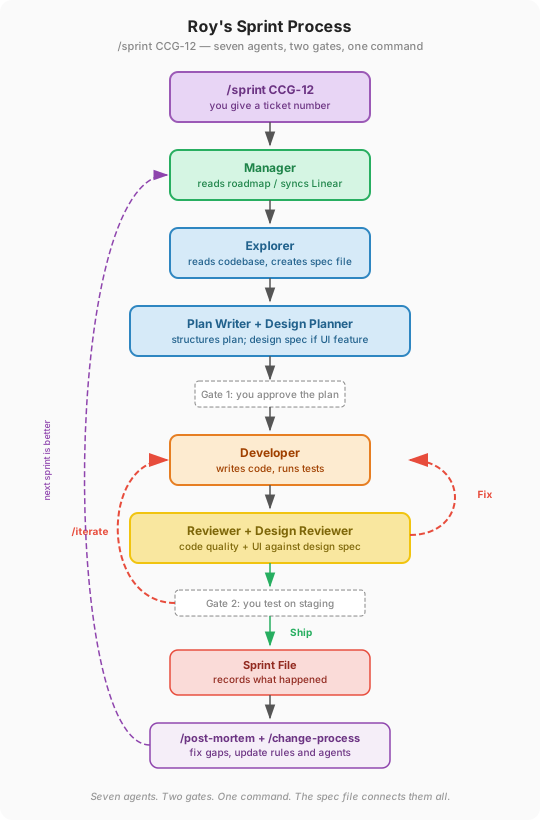
- The manager reads the ticket from the roadmap (or syncs it from Linear).
- It dispatches the explorer, who reads the codebase and creates a spec file in
technical-specs/. - The plan writer reads the spec and creates a plan. If the feature involves UI, the design planner creates a design spec too. The manager shows me the plan — gate 1.
- I approve (or adjust). The manager dispatches the developer.
- The developer builds, following the plan (and design spec, if one exists). Tests pass.
- The reviewer checks the code. For UI features, the design reviewer also checks the implementation against the design spec. If either reviewer sends it back, the developer fixes and resubmits.
- The developer deploys to staging. The manager tells me it's ready — gate 2.
- I test on staging. If something's off, I type
/iteratewith feedback. The developer fixes it. - When I'm satisfied, I approve production deployment.
- A sprint file records what happened. I run
/post-mortemif something notable went wrong, and/change-processto feed the learnings back into the system.
Every agent reads CLAUDE.md (project config) and the rules (coding standards, security, testing). Every agent logs its work to the spec file. The spec file is the thread that connects them all.
The files that make it work
| File | What it does | Config layer (Ch6) |
|---|---|---|
.claude/agents/em.md | Manager — dispatches agents, enforces gates | Agent |
.claude/agents/explorer.md | Explorer — reads codebase, creates spec | Agent |
.claude/agents/plan-writer.md | Planner — structures the implementation plan | Agent |
.claude/agents/design-planner.md | Design Planner — creates design specs for UI features | Agent |
.claude/agents/developer.md | Developer — writes code, runs tests, deploys | Agent |
.claude/agents/reviewer.md | Reviewer — checks quality, approves or rejects | Agent |
.claude/agents/design-reviewer.md | Design Reviewer — checks UI against design spec | Agent |
.claude/commands/sprint.md | The sprint command — triggers the full workflow | Command |
.claude/commands/iterate.md | The iterate command — fixes issues after testing | Command |
.claude/commands/post-mortem.md | Captures learnings, proposes system improvements | Command |
.claude/commands/change-process.md | Updates agents, commands, rules after learnings | Command |
.claude/commands/create-issue.md | Creates a ticket and adds it to the roadmap | Command |
.claude/rules/*.md | Coding style, testing, security, stability, performance | Rules |
CLAUDE.md | Project config — what to build, how to run, where to deploy | Instruction file |
docs/roadmap.md | Task backlog — what to build next | Reference data |
docs/technical-specs/ | One spec per feature — the shared brain | Project structure |
docs/sprints/ | Sprint files — what happened during each work session | Project structure |
docs/post-mortem/ | Post-mortems — what went wrong and how to fix the process | Project structure |
docs/design-specs/ | Design specs — UI layout and interaction plans | Project structure |
That's a lot of files. Most projects don't need all of them. The blog system from Chapter 8 had seven files total and worked great. This system has more because software development has more moving parts — more agents, more handoffs, more places where things can go wrong.
Other systems to study
My system is one approach. Here are other public configurations worth browsing — each takes a different angle on the same problem:
Curated collections — good starting points for discovering what's available:
- awesome-claude-code — A curated list of skills, commands, agents, hooks, and workflow guides. Organized by category with dozens of entries in each. Start here if you want to browse what the community has built.
- awesome-claude-code-toolkit — A larger collection: 135 agents, 42 commands, 120 plugins, 19 hooks. More catalog than tutorial, but useful for finding specific tools.
Complete configurations — full systems you can study end to end:
- everything-claude-code — A battle-tested setup from an Anthropic hackathon winner. Includes 13 specialized sub-agents, 40+ skills, 32 slash commands, and hooks for session persistence. One of the most comprehensive public configurations.
- claude-code-showcase — A clean example of a complete
.claude/directory: agents, commands, hooks, skills, and GitHub Actions integration. Good for seeing how the pieces fit together.
Specialized deep dives — focused on specific aspects:
- claude-code-hooks-mastery — A thorough walkthrough of all hook lifecycle events with working examples. If you want to understand hooks beyond the basics in Chapter 6, this is the reference.
- claude-code-sub-agents — A collection of 33 specialized sub-agents organized by domain: frontend, backend, security, data, DevOps. Useful as templates for writing your own agents.
My configuration — the actual files behind this chapter:
- github.com/royfrenk/claude-config — Every agent, command, and rule described in this chapter. Browse the actual markdown files, not just the descriptions above.
Build your own
This is my system. It fits how I work. Yours will be different — and it should be.
The pattern is what matters: define what good work looks like, create agents for distinct roles, wire them together with a command, and improve the system every time something goes wrong.
Start with the minimum: one agent, one command, a few rules. Add an explorer when you notice the agent keeps missing context. Add a reviewer when you notice the same bugs getting through. Add rules when you notice the same mistakes repeating. Let the gaps tell you what to build next.
Practical tips
Don't copy this system wholesale. Start with one agent and one command. Add complexity only when you feel a gap — not because a chapter told you to.
Rules are born from mistakes. Every rule in my system started as a bug or a wasted hour. When an agent makes a mistake you don't want repeated, write it down as a rule. That's the entire process.
The spec file is the most important file. It's the shared brain that connects all the agents. If you adopt one thing from this chapter, make it spec files — a single document per feature that records what the explorer found, what the plan is, and what the developer built.
Post-mortems are how the system gets smarter. They're optional but powerful. A five-minute review after each sprint surfaces the gaps. A one-line fix to a rule prevents the same mistake next time. Compound that over months and the system becomes remarkably good.
Study other systems, don't copy them. The links above are references, not templates. Browse them to see how other people solve the same problems, then build what fits your workflow.
More reading
- Cooking with Claude Code: The Complete Tutorial and Guide (Sid Bharath) — A comprehensive guide covering agents, skills, commands, hooks, and plugins, with practical examples of building a complete system.
- awesome-claude-code (GitHub) — A curated collection of community-built skills, commands, agents, and hooks for Claude Code, organized by category.
- Claude Code Sub-Agents (GitHub) — 33 specialized sub-agent templates organized by domain (frontend, backend, security, data, DevOps), useful as starting points for building your own agents.
- Designing Agentic Loops (Simon Willison) — A thoughtful look at how to structure the loops that agents run in, with practical considerations for safety, cost control, and human oversight.