Chapter 11 · ~8 min read
Building Software with Agents
The same process from Chapter 7 — orchestrator, explorer, actor, reviewer, iterate — scales to building software. The blog used two agents (researcher and writer). Software adds more: a manager dispatches, an explorer researches the codebase, a developer writes code, and a reviewer checks quality. Gates pause the process for your approval.
Building Software with Agents
TL;DR: The same process from Chapter 7 — orchestrator, explorer, actor, reviewer, iterate — scales to building software. The blog used two agents (researcher and writer). Software adds more: a manager dispatches, an explorer researches the codebase, a developer writes code, and a reviewer checks quality. Gates pause the process for your approval.
Chapters 7 and 8 showed the recommended process and how to build a system for it — using a blog as the example. This chapter shows what happens when the same process scales up to building software. The shape is the same. The number of agents changes.
Before you jump in
If you haven't built software before, don't start here. Start with an all-in-one platform like v0 or Lovable (Chapter 3) and a simple project — a personal website, a landing page, a basic tool. Those platforms handle the complexity for you: hosting, deployment, version control, all wired together. You'll learn how software works by hitting walls — things that break, features that don't behave, layouts that look wrong on mobile. That experience teaches you more than any chapter can.
Once you've shipped something simple and understand the basics — what a build is, what deployment means, what happens when you change a file — then come back here. This chapter is about scaling up: more agents, more moving parts, more structure. It only makes sense if you've already built something small.
From two agents to many
The blog example used two sub-agents — a researcher and a writer — coordinated by a command file. Software needs more. The codebase is larger, the work is more specialized, and mistakes are harder to undo. So the roles expand: a manager coordinates, an explorer reads the codebase, a developer writes code, and a reviewer checks quality before anything ships.
The cast
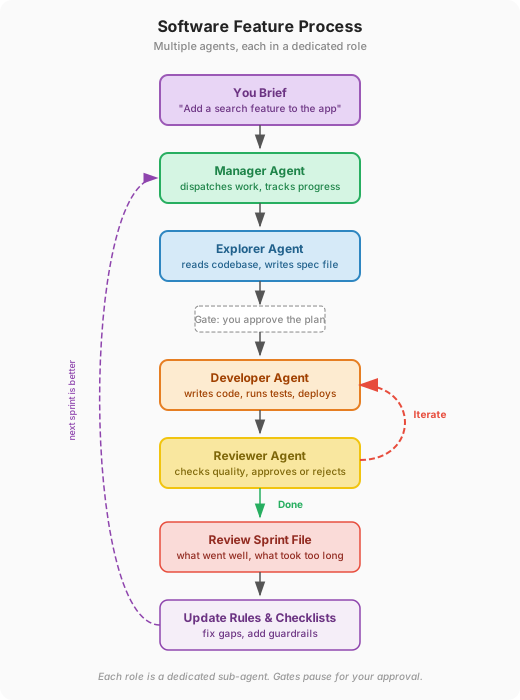
| Process role | Agent | What it does |
|---|---|---|
| Orchestrator | Manager | Dispatches agents, tracks progress, enforces gates |
| Explorer | Explorer | Reads the codebase, identifies what needs to change |
| Actor | Developer | Writes the code, runs tests, deploys |
| Reviewer | Reviewer | Checks quality, approves or sends back |
These are custom agents — the same concept from Chapter 6. Each is a markdown file that defines what the agent does, what it can access, and how it behaves.
Example: Adding search to an app
You've been building a podcast app. Users can browse episodes, but there's no way to search. You type: "Add a search feature — users should be able to search episodes by title and description."
Here's how the agents handle it:
1. You brief the manager. The manager receives your request and dispatches the explorer first. No code gets written yet.
2. Explorer reads the codebase. The explorer goes through the existing project: the database schema, the API endpoints, the frontend components. It produces a spec file — a document that records what it found and what needs to change. Something like:
- The episodes table has
titleanddescriptioncolumns — both searchable - There's no search endpoint yet — need to add
GET /api/episodes/search - The frontend has an episode list component — add a search bar above it
- The app uses a specific CSS framework — the search bar should match
The spec file becomes the shared brain for the rest of the process. Every agent reads it.
3. Planner writes the plan. Based on the explorer's findings, a plan gets written: what to build, in what order, what depends on what. You see it before any code is written. This is a gate — the process pauses until you say "go."
Maybe you look at the plan and say: "Also add a filter for episode length — short, medium, long." The planner updates the plan. You approve. Now the developer knows exactly what to build.
4. Developer builds. The developer writes code in small steps — the API endpoint first, then the frontend component, then the filter. Each piece gets tested before moving to the next. Progress gets logged in the spec file so nothing falls through the cracks.
5. Reviewer checks. The reviewer reads the code, checks for quality issues, and either approves or sends it back. If the developer forgot to handle the case where the search returns no results, the reviewer catches it. The developer fixes it. This is the iteration loop — it runs until the reviewer approves.
6. You test. The developer deploys to a preview environment — a temporary version of your app where you can try the changes. You search for an episode. The results work, but they're sorted alphabetically instead of by relevance. You say: "Sort results by relevance, not alphabetically." The developer iterates.
7. Post-mortem. After the feature ships, a sprint file records what happened: which tasks were completed, what issues came up, what took longer than expected. The search endpoint took two extra rounds because the explorer missed that descriptions were stored as HTML, not plain text. Good to know for next time.
8. Change process. You add a note to the explorer's instructions: "When checking database fields for search, verify the storage format — plain text vs. HTML vs. markdown." Next feature, the explorer catches this upfront.
Gates: where you stay in control
Two moments in this process require your approval before anything continues:
- After the plan. You see what's going to be built before any code is written. This is the cheapest place to catch misunderstandings — changing a plan costs nothing, changing finished code costs time.
- After the build. You test the feature in a preview environment before it goes to production. This is your safety net.
Everything between the gates runs automatically. The agents coordinate, hand off work, and iterate with each other. You step in at the decision points.
Same process, more moving parts
The blog used two agents — researcher and writer. The software sprint uses four or more, each in a dedicated role. But the recommended structure from Chapter 7 is the same: user input, orchestrator, explorer, actor, reviewer, iterate, post-mortem, change process. The number of agents changes. The complexity of the work changes. The process scales to fit.
Chapter 12 covers the default commands that ship with Claude Code. Chapter 13 walks through a real system built for software development — every agent, command, and rule, broken down the same way Chapter 8 broke down the blog system.
Practical tips
Start simple, add agents later. Your first tasks should use a single agent with a command file. Get comfortable with the input-explore-work-review loop before introducing sub-agents. Most tasks don't need a five-agent team.
The iteration loop is where the value is. The first draft is never the final version — for blog posts or software. Get comfortable giving specific feedback: not "this isn't right" but "the button should be on the left" or "the search results should show newest first." The agent improves with each round.
Gates exist to protect you. Approving a plan before code gets written is not bureaucracy — it's the cheapest place to catch misunderstandings. Reviewing code before it ships is the second cheapest. The most expensive place to find a problem is in production.
Always do the post-mortem. Even a quick scan of what happened tells you what to change. This is how your process gets better over time — not by reading documentation, but by reviewing your own work.
More reading
- My LLM Coding Workflow Going into 2026 (Addy Osmani) — A senior Google engineer's real workflow for building software with AI agents: planning, chunking work, quality gates, and the importance of human oversight.
- Vibe Coding as a Software Engineer (Pragmatic Engineer) — What happens when professional engineers use AI to write code at scale, including the tradeoffs between speed and understanding.
- 2026 Agentic Coding Trends Report (Anthropic) — Anthropic's data on how developers are using coding agents in practice: adoption rates, workflow patterns, and where agents help most.
- A Practical Guide to Building Agents (OpenAI) — OpenAI's guide to agent design for product and engineering teams, covering orchestration patterns and real deployment examples from companies like Coinbase and Thomson Reuters.