Chapter 8 · ~11 min read
Content Writing Example
This chapter puts the meta-process from Chapter 7 into practice with a real project — a blog about flags. One command produces a full draft, using two agents, two skills, and a command file. Then we walk through how the system was built, step by step.
Content Writing Example
TL;DR: This chapter puts the meta-process from Chapter 7 into practice with a real project — a blog about flags. One command produces a full draft, using two agents, two skills, and a command file. Then we walk through how the system was built, step by step.
The example: a flag blog
A friend of mine writes a blog about flags — vexillology, the study of flag design and symbolism. He set up a system where typing /write-post Poland produces a full draft in his voice.
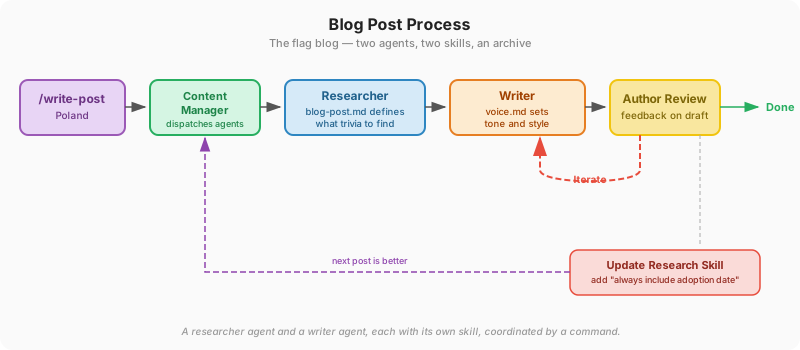
The command file (content-manager.md) is the orchestrator — it dispatches two sub-agents in sequence. First, a researcher agent uses a research skill (blog-post.md) that tells it what kind of trivia to look for: origin stories, hidden symbolism, design oddities, human stories behind the flag. The researcher searches the web, collects data organized by those categories, and checks the archive of previous posts to avoid repeating what's been covered.
Then a writer agent picks up the research findings. A voice skill (voice.md) tells it how the author sounds — this file was generated by having the agent analyze the archive of 89 previous posts and describe the writing style. The author reviewed it, made corrections, and saved it as a reusable skill. The writer drafts the post in that voice. The author reviews, gives feedback ("too formal in the opening," "the coat of arms section needs more detail"), and the agent revises. Two or three rounds and he has a publishable post.
Here's how the roles from Chapter 7 map to the flag blog:
| Process role | What did it | Config layer (Ch6) |
|---|---|---|
Orchestrator — content-manager.md | Triggered the workflow, dispatched the agents | Command |
| Explorer — researcher agent | Used blog-post.md skill to know what trivia to look for, searched the web, checked archive for previous coverage | Agent + Skill |
| Actor — writer agent | Used voice.md (generated from old posts) to draft in the author's style | Agent + Skill |
| Reviewer — the author | Gave feedback, iterated until satisfied | Human review |
| Change process — updated research skill | Fixed a recurring gap (missing adoption dates) | Skill |
One command. Two agents. Two skills. An archive. The rest of this chapter walks through how each piece was built.
Step 0: Create a folder and connect it to Git
Before anything else — before collecting material, before configuring agents — create a project folder and initialize it as a Git repository. This is the first step for any project, not just software.
Create a new folder called flag-blog, initialize Git, and create a GitHub repo for it
Claude creates the folder, runs git init, and connects it to GitHub. From this point on, every change is tracked and backed up. When the agent rewrites your voice file and you prefer the old version — you can go back. When you want to work from a different machine — clone the repo and keep going.
This takes thirty seconds. Do it at the start of every project.
Step 1: Collect the source material
Whatever your domain, the first step is the same: get your existing material into files the agent can read.
He asked the agent:
Go to my old blog at [URL] and download every post. Save them all into a single
markdown file called archive.md, organized by date with the title as a heading.
The agent crawled the site, pulled every post, and produced a single archive.md file — 89 posts spanning several years. This one file became the foundation for everything that followed. The agent analyzed it to generate the voice skill (Step 2). The author studied his own patterns in it to define the research playbook (Step 3). And every new post gets checked against it to avoid repeating old content. One archive, three purposes — all from a single collection step.
Step 2: Generate a voice skill
The archive wasn't just a reference — it was a training dataset for voice. He asked the agent:
Read through archive.md and analyze my writing style. Create a document called
voice.md that describes how I write — sentence patterns, tone, vocabulary level,
humor style, recurring phrases, structure of a typical post.
The agent read all 89 posts and produced a style guide. Here's a sample of what it captured:
## Tone
"Expert-Casual" — two enthusiastic flag-nerd
friends telling stories in a pub. Visible
enthusiasm. Everyday language. Willing to say
"we don't know everything."

## Sentence patterns
- Short dramatic sentences ("That's it. Done.")
  mixed with longer narrative ones
- Fragments are fine: "Cool, right?"
- Three dots for drama: "Gone forever? Maybe..."

## Signature tools
- Parenthetical asides: "(we don't know if he
  really existed, but the story's too beautiful
  not to tell)"
- Rhetorical questions answered immediately
- Self-aware humor: "No, the channel won't be
  called 'fun with flags.'"

## What NOT to do
- No academic language ("It should be noted...")
- No condescension
- No emoji
- Never a fact-list — always a narrative
He reviewed it, made corrections ("I'm more sarcastic than that," "I never use bullet lists"), and saved it as .claude/skills/voice.md. Now any time the agent needs to write in his voice, it loads this skill. The voice file is the single highest-leverage piece of configuration — it's what makes the output sound like him instead of generic AI text.
Step 3: Define the research playbook
Telling an agent "research Poland's flag" is too vague. You'll get a generic Wikipedia summary. The fix: define what "interesting research" means for your domain.
He created a second skill — .claude/skills/blog-post.md — that lists 10 specific categories of trivia he cares about:
- Origin story and historical drama — who designed it, why, what political deal was behind it
- Surprising connections to other flags — influences, "flag families," unexpected relationships
- Hidden symbolism — color meanings, heraldic elements, religious symbols
- Design oddities — unusual shapes, rare colors, exotic elements
- Human stories — the designer, the seamstress, the flag thief
- Flag protocol and customs — how to raise it, local traditions, half-mast rules
- Failed redesign attempts — referenda, rejected proposals, political debates
- Trivia — conversation-starter facts, pop culture connections
- Cultural-emotional context — how people relate to their flag, controversies
- Professional vexillology terminology — terms that make the reader feel smarter
The skill also defines quality standards: find what Wikipedia doesn't cover, prioritize human stories, source every fact. When the explorer agent runs, it uses this file as its playbook — searching for each category independently, producing organized research instead of a generic blob.
This is the difference between "do research" and "here's what interesting research looks like for us."
Step 4: Define the agents
The research and writing are different kinds of work, so the author split them into two custom agents — the same concept from Chapter 6:
.claude/agents/researcher.md— searches the web using the research playbook, checks the archive for previous coverage, and saves organized findings to a research file..claude/agents/writer.md— reads the research findings, loads the voice skill, and drafts the post.
Each agent file describes what it does, what skills it uses, and what it produces. The researcher uses blog-post.md as its playbook. The writer uses voice.md as its style guide. They don't need to know about each other — the command file connects them.
Step 5: Build the command
The command file (.claude/commands/content-manager.md) is the orchestrator — the recipe that chains the agents together. It's not code. It's a plain-text checklist:
Write a new blog post about: $ARGUMENTS

Steps:
1. Run the researcher agent:
   - Use .claude/skills/blog-post.md for categories
   - Search the web, organized by category
   - Check archive.md for previous coverage
   - Save findings to research-notes.md
2. Run the writer agent:
   - Read research-notes.md
   - Write the post using .claude/skills/voice.md
   - Save to posts/
3. Present the draft for review.
That's it. The command dispatches two agents, each with its own skill, connected by a shared file. When the author types /content-manager Poland, the agents run in sequence — research first, then writing.
Step 6: Run it, review, improve
Here's what happens when the author types the command:
The researcher agent reads the research skill and searches the web for Poland's flag — origin stories, symbolism, design oddities, the eagle that lost its crown during communism and got it back in 1989. It checks the archive to see if Poland was covered before and saves organized findings. Then the writer agent picks up those findings, loads the voice skill, and drafts the post — opening with an intriguing riddle (the blog's signature move), weaving in humor and parenthetical asides, ending with a sign-off.
The author reads the draft. "The section about the crown needs more historical context." "The opening riddle gives away too much." The agent revises. Two or three rounds and the post is ready.
After a few posts, the author noticed the agent kept missing adoption dates. He added a line to the research skill: "always include the adoption date and the designer if known." Next post, the agent got it right. This is the change process from Chapter 7 — surfacing a gap and fixing it in the configuration, not in a one-off prompt.
The files that make it work
| File | What it does | Config layer (Ch6) |
|---|---|---|
.claude/commands/content-manager.md | The command — triggers the workflow, dispatches agents | Command |
.claude/agents/researcher.md | The researcher — searches the web using the research playbook | Agent |
.claude/agents/writer.md | The writer — drafts the post in the author's voice | Agent |
.claude/skills/blog-post.md | The research playbook — 10 categories of trivia to look for | Skill |
.claude/skills/voice.md | The voice — how the author writes (generated from old posts) | Skill |
archive.md | The archive — 89 previous posts for context and dedup | Reference data |
posts/ | Output directory — where drafts get saved | Project structure |
One command. Two agents. Two skills. An archive. The author types a single command and gets a draft in his voice, informed by his research standards, that doesn't repeat what he's already written. The hard part wasn't any individual piece — it was knowing which pieces to create and how they connect.
Practical tips
Start by collecting the source material. Whatever your domain, the first step is always getting your existing material into files the agent can read. Old blog posts, past invoices, reference documents, templates — dump it all into markdown files. The agent can only work with what it can see. This archive becomes the foundation: the agent analyzes it to learn your voice, you study it to define your standards, and it serves as reference data during every run.
Your voice file is the highest-leverage investment. If you're doing any kind of writing work, spend the time to get your voice file right. Have the agent analyze your existing writing, then correct it. A good voice file turns generic AI output into something that sounds like you.
Don't just say "do research" — define what good research means. A research playbook that lists specific categories produces organized, useful output. A vague "research this topic" produces a Wikipedia summary. The more specific your skill, the better the results.
Commands are just prompts with structure. Don't overthink them. Write the steps you'd follow yourself, put them in a markdown file in
.claude/commands/, and now you've got a repeatable workflow. You can always refine it after a few runs.
More reading
- Creating an AI Agent to Write Blog Posts with CrewAI (Towards Data Science) — A walkthrough of building a multi-agent writing system with a planner, writer, and editor, similar to the flag blog pattern in this chapter.
- Automate Blog Creation in Brand Voice with AI (n8n) — A practical workflow template that chains research, writing, and brand voice enforcement, demonstrating the same skill-based approach used in the flag blog. (Note: n8n is a different automation tool, not Claude Code — but the workflow pattern is the same.)
- The Complete Guide to Building Skills for Claude (Anthropic) — How to create and structure skills like the voice and research playbook files described in this chapter.