Chapter 2 · ~7 min read
Memory and Context
AI agents have limited memory. Every time you start a new session, the agent starts fresh — it doesn't remember what you did before. To work well with agents, you need to think about how to give them context and how to get them to leave notes for next time.
Memory and Context
TL;DR: AI agents have limited memory. Every time you start a new session, the agent starts fresh — it doesn't remember what you did before. To work well with agents, you need to think about how to give them context and how to get them to leave notes for next time.
In the movie Memento, the main character can't form new long-term memories. Every few minutes, he wakes up with no idea what just happened. To function, he builds a system of notes, photos, and tattoos — external memory for a brain that can't hold onto anything.

Working with AI agents is the same problem. Here's the shape of it:
The memory problem at a glance
- Agents have a fixed-size short-term memory (called a context window). It holds your conversation, files the agent has read, and instructions — but it has a hard limit.
- When it fills up, early information gets dropped. The agent doesn't crash — it just quietly forgets things you said earlier in the session.
- New session = blank slate. Close the session and open a new one, and the agent remembers nothing. Zero.
- You solve this with external memory — files, project structure, and session briefings that give the agent context it can't hold on its own.
The context window
How it works
Everything the agent knows exists inside the context window — a fixed-size container that holds roughly 100,000–200,000 tokens (a token is about ¾ of a word). That sounds like a lot, but when the agent is reading files, tracking conversation, and working through code, it fills up.
When it's full, the earliest parts of the conversation drop out. Instructions you gave at the beginning might quietly disappear. And when you close a session and start a new one, it empties completely.
What this means in practice
You work with an agent for an hour, make a dozen decisions, close the session. Next day: blank slate. The agent can scan your files and reconstruct what exists — but not why you chose it, or that you were mid-way through fixing a bug. That context is gone. This isn't a bug. It's how these systems work right now.
Building external memory
Since the agent can't remember, you build the memory system. There are three layers, and a strategy for getting the agent to help.
Three layers
From most permanent to most temporary:
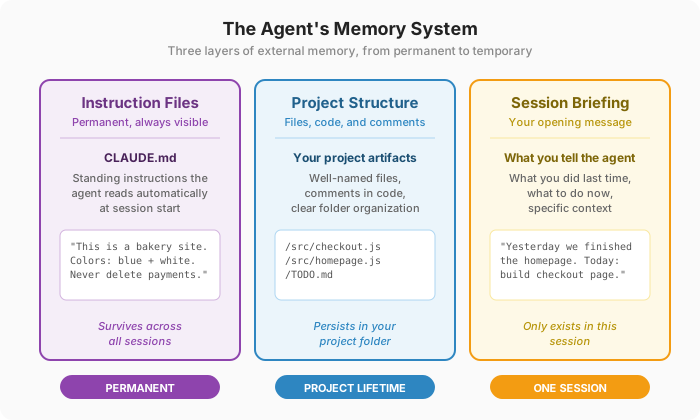
Instruction files (permanent). A file like CLAUDE.md that sits in your project and contains standing instructions: what this project is, what technologies it uses, what the agent should never touch. The agent reads this automatically at the start of every session. You write it once, update it occasionally. (We'll build these files step by step in Chapter 6.)
The .md extension stands for Markdown — a simple way to write formatted text using plain characters. You don't need special software to write it — any text editor works. Here's what a markdown file looks like raw:
# Project: Clean Paws

A website for a dog grooming business.

## Rules
- Never delete the /assets folder
- Use **plain CSS**, not Tailwind
- Keep the design *minimal*
And here's how that same text renders when displayed by a tool like VS Code or GitHub:
Project: Clean Paws
A website for a dog grooming business.
Rules
- Never delete the /assets folder
- Use plain CSS, not Tailwind
- Keep the design minimal
Same content, two views. Markdown files are everywhere in software projects because they work both ways — readable as plain text, and nicely formatted when rendered. CLAUDE.md is just a markdown file with a specific name that Claude Code looks for.
Project structure and comments (project lifetime). Your files, code, folder names, and the notes inside them. Clear file names, good comments, a well-organized folder structure. When the agent starts a fresh session and scans your project, these are the clues it uses to figure out what's going on.
Session briefing (one session). What you tell the agent at the start of each session: "Yesterday we finished the homepage. Today we're working on the checkout page. Here's what's left." This connects the permanent files and the project structure into a plan for right now.
Getting the agent to take its own notes
You can tell the agent to leave notes for its future self. Ask it to update the project documentation, write clear commit messages (a commit message is a short note that gets saved every time you save a version of your code — more on this in Chapter 5), or maintain a to-do list file that tracks what's done and what's left.
This turns the agent into an active participant in its own memory system. It still won't remember — but the next session's agent will find better clues.
The two timelines
Every time you work with an agent, keep two questions in mind:
- Right now: Does the agent have enough context to do this task correctly?
- Next time: When a fresh session starts, will it be able to pick up where this one left off?
If something "broke" between sessions, the agent didn't forget. It never knew. The knowledge needs to live outside the agent's head.
Practical tips
Start each session with context. The agent starts fresh every session. Give it a quick briefing: "We're working on the Clean Paws website. Yesterday we finished the homepage and the contact form. Today I want to work on the About page. Check the CLAUDE.md for project details." Thirty seconds of context saves minutes of confusion.
End each session with a save. Before closing: (1) commit your changes — "Commit everything with a message about what we did today," (2) push to GitHub — "Push to GitHub," (3) optionally, ask the agent to update notes — "Update the CLAUDE.md with what we accomplished and what's left to do." This takes a minute and means tomorrow's session starts clean.
Know when to start fresh. If the agent seems confused, if the conversation is going in circles, or if you've been going back and forth on the same issue for too long — start a new session. A fresh agent with a clear instruction is often more productive than a confused agent with a long conversation history.
More reading
- What Is a Context Window? (IBM) — A clear explanation of context windows, what they hold, and why they matter for every AI interaction.
- How Does LLM Memory Work? (DataCamp) — A deeper look at the different types of AI memory — short-term, long-term, and external — and how to build context-aware applications.
- What Is a Context Window — and Why Does It Matter? (Zapier) — A plain-language walkthrough of context windows, what fills them up, and the tradeoffs of bigger vs. smaller windows.
- What Are AI Tokens and Context Windows, and Why Should You Care? (Simple.ai) — A conversational explainer of how AI breaks text into tokens and why context windows have a hard limit.