Chapter 1 · ~11 min read
What AI Agents Are (and Aren't)
An AI agent is a piece of software that can take actions on its own — write code, create files, run commands — not just answer questions. But agents are narrow: they do what you tell them, eagerly and literally. Your job isn't to do the work. It's to direct it clearly.
What AI Agents Are (and Aren't)
TL;DR: An AI agent is a piece of software that can take actions on its own — write code, create files, run commands — not just answer questions. But agents are narrow: they do what you tell them, eagerly and literally. Your job isn't to do the work. It's to direct it clearly.
If you've seen Disney's Fantasia, you remember the scene. Mickey enchants a broom to carry water. It works perfectly — until it doesn't know when to stop and floods the room. That broom is an AI agent.

What agents are
Before we get into details, here's the shape of it:
- Agents act, not just talk. Unlike a chatbot that answers questions, an agent creates files, writes code, runs commands, and takes a series of steps to complete a task.
- Agents are eager and literal. They'll start immediately and keep going, making decisions along the way. If you're vague, they'll fill in the gaps with whatever seems reasonable — and you might not agree.
- Your job is direction, not execution. You won't write code. You'll brief clearly, set boundaries, and course-correct.
The agentic loop. When you give an agent a task like "build me a website," it doesn't hand you a block of text and say "here, copy this." It actually creates the files, writes the code, installs software, and sets up the project. It takes a series of actions, one after another, to get from your request to a result.
The technical term for this is an agentic loop — the agent reads your instruction, decides what to do first, does it, checks the result, decides the next step, and keeps going until it thinks the job is done.
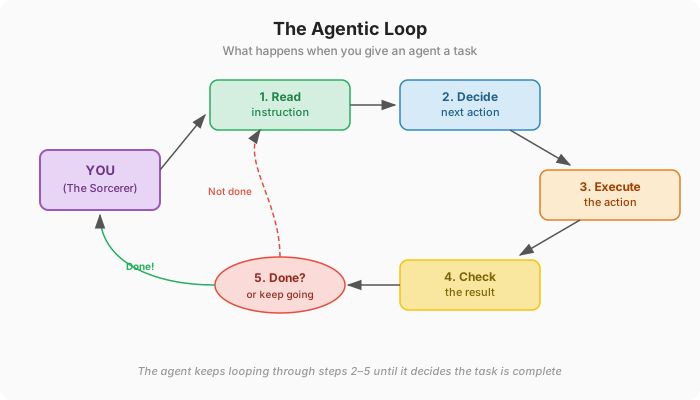
The brooms are eager. Agents will start working the moment you give them something to do, and they will keep going. This is a feature and a problem.
If you say "make me a website," the agent will make one — but it'll make a hundred decisions along the way that you might not agree with. What colors? What layout? What framework? It'll pick whatever seems reasonable and keep moving, because you didn't tell it to stop and ask.
How to direct well
You need to get good at directing the thing that does the work. That means three things: talking to it clearly, giving it tools for context, and setting guardrails.
Voice and briefing. You're not chatting — you're briefing. Plain, direct language. State what you want, then state what you don't want.
Vague (bad):
"Make me a nice website for my business"
Specific (better):
"Create a single-page website for a dog grooming business called 'Clean Paws.' Four sections: hero with the business name and a booking button, services list, pricing table, and contact form. Clean, minimal design. Light background, dark text. No animations."
A few rules of thumb:
- Be concrete. "A table with columns for name, email, and signup date" beats "some kind of user list."
- Say what you don't want. "Don't use any external libraries" or "Don't change the homepage" saves you from undoing work later.
- Break it down, then sequence it. Don't hand the agent a whole project at once. Split the work into steps and give them one at a time: "create the project structure and a homepage with placeholder content." Check it. Then give the next step. The agent won't do this for you — sequencing is your job.
- When something's wrong, say what's wrong. Not "this isn't right" but "the nav bar should be on the left side, not the top, and the links should be Home, Services, Pricing, Contact."
Tools that help
A spec or brief. A text file describing what you're building — who it's for, what it should do, what it should look like. Keep it as a file in the project that the agent reads automatically. More on this in Chapter 6.
Reference images. Most agents can look at images. A screenshot of a website you like, a rough sketch, a wireframe — these give the agent more to work with than words alone.
Checklists. A list of "the page should have X, Y, and Z" gives both you and the agent something to verify against.
Guardrails
Telling the agent what to do is only half the job. You also need to tell it what not to do. Without boundaries, agents will make "reasonable" choices that might be wrong — rewriting files you didn't want touched, picking technologies you don't want, or deleting things they think are unused.
- "Don't modify any files in the /payments folder."
- "Use plain CSS, not Tailwind."
- "Ask me before deleting anything."
- "Keep the existing database structure — don't redesign it."
One broom or many?
Sometimes you'll use a single agent. Other times, multiple agents on different parts of a project — one on the front end, another on back-end logic, another writing tests. Each is focused but unaware of what the others are doing. The tools handle this differently — Claude Code can spawn sub-agents to work on tasks in parallel, Antigravity has a dedicated Manager View for it, and the others are catching up. We'll cover the specifics in Chapter 3.
The engines underneath
Every agent runs on top of an AI model (sometimes called an LLM, which stands for Large Language Model). The model is the engine — the thing that actually reads your instructions, reasons about them, and generates code. The tool you use (Claude Code, Cursor, etc.) is just the interface. Understanding the engines matters because they have different strengths, different costs, and some tools let you switch between them.
Comparing the models
| Claude (Anthropic) | GPT / Codex (OpenAI) | Gemini (Google) | |
|---|---|---|---|
| Main models | Sonnet 4.6 (fast), Opus 4.6 (powerful) | GPT-4o (fast), o1 (reasoning) | Gemini 2.0 Flash (fast), 2.5 Pro (powerful) |
| Subscription | $20/mo (Pro), $100–200/mo (Max) | $20/mo (Plus), $200/mo (Pro) | $20/mo (AI Pro), $250/mo (Ultra) |
| API cost (per 1M tokens) | Sonnet: $3 in / $15 out | GPT-4o: $2.50 in / $10 out | Flash: $0.10 in / $0.40 out |
| Strengths | Strong code generation, good at following detailed instructions, powers Claude Code | Large ecosystem, GPT-4o is price-competitive, o1 excels at complex reasoning | Flash is extremely cheap, good multimodal, integrates with Google Cloud |
| Weaknesses | Smaller ecosystem than OpenAI | o1 reasoning tokens inflate costs (hidden internal "thinking" tokens count toward your bill) | Lower code quality than Claude/GPT flagships, less mature tooling |
| Best for | Production coding agents, detailed project work | General coding tasks, complex reasoning (o1) | Cost-sensitive projects, quick prototyping |
How you pay for the engine
There are two ways to access these models:
Subscription (through a product UI). You pay a monthly fee ($20/mo is the common entry point across all three) and get access through a chat interface or tool. Usage is included up to a limit. This is how most people start.
API (direct access). API stands for Application Programming Interface — a way for one piece of software to talk to another. You pay per use based on tokens sent and received (a token is roughly ¾ of a word). No monthly cap — you pay for what you use. More flexible, but requires setup: you need an API key (a password-like string that identifies your account to the service).
The big takeaway: Gemini Flash is dirt cheap, GPT-4o and Claude Sonnet are in the same ballpark, and the premium reasoning models (o1, Opus) cost 5–10x more. For beginners, start with a subscription. As you use agents more heavily, you may want to switch to API access for more headroom.
Cheap models vs. expensive models
Not every task needs the most powerful model. Here's how to think about it:
| Model tier | Cost | Good for | Examples |
|---|---|---|---|
| Fast/cheap (Gemini Flash, Claude Haiku, GPT-4o mini) | ~$0.10–0.50 per 1M tokens | Repetitive tasks, simple edits, reformatting, generating boilerplate code, summarizing text, quick Q&A | "Rename all variables from camelCase to snake_case," "Add comments to this file," "Convert this JSON to CSV" |
| Mid-range (Claude Sonnet, GPT-4o) | ~$3–10 per 1M tokens | Most coding work, writing features, debugging, building pages, multi-step tasks that require understanding context | "Build a checkout page with form validation," "Find and fix the bug in the payment flow," "Refactor this component" |
| Premium (Claude Opus, o1, Gemini Pro) | ~$15–60 per 1M tokens | Complex architecture decisions, multi-file refactoring, tricky debugging, tasks that need deep reasoning across a large codebase | "Redesign the authentication system to support SSO," "Why is the app crashing under load — investigate and fix," "Plan the migration from REST to GraphQL" |
The practical rule: start with a mid-range model. Drop to cheap for grunt work. Escalate to premium when the agent is struggling or the task genuinely requires reasoning across a lot of context. If you're on a subscription, the platform handles this for you. On API, you choose — and your bill reflects it.
Practical tips
Say what, not how. You don't need to tell the agent how to do something — that's its job. Focus on what you want the result to be. "Create a centered section with a large heading and a paragraph of description text below it" beats "Create a div with flexbox, justify-content center, add an h1 with font-size 2rem." The agent knows CSS better than most humans. Let it pick the implementation.
Give context about why. When the agent understands why you want something, it makes better decisions about edge cases. "Add a character limit to the text input" is fine. "Add a character limit to the text input — this is for SMS messages, so it needs to be 160 characters max, with a counter so users know how many they have left" is better.
One task at a time. Don't dump five requests into one message. The agent handles one task well. Five tasks in one message means it might rush through some or miss details. "Add a contact form with name, email, and message fields" — then, after it's done — "Now fix the header spacing."
Ask the agent to explain before acting. When you're unsure about something, ask first: "Before making any changes — explain how you would add user authentication to this project. What technologies would you use, and what files would you need to create?" This gives you a plan to review before any code is written.
Read what the agent changed. The agent tells you what it did after each task. Read it. Sometimes it makes assumptions you didn't intend — changing a file you didn't ask about, using a library you don't want, or interpreting your request differently than you meant. Catching these early is easy. Catching them three tasks later is hard.
Watch what you approve. When the agent asks permission to run a command or make a change, read the request before approving. Pay special attention to file deletions, package installs, and configuration changes.
More reading
- The Agentic Loop, Explained: What Every PM Should Know (iKangai) — A non-technical breakdown of the perceive-reason-act cycle that powers every AI agent.
- The Complete Beginners Guide to Autonomous Agents (Matt Shumer) — An accessible introduction to how agents work, what they can do, and their limitations.
- Not All AI-Assisted Programming Is Vibe Coding (Simon Willison) — The distinction between letting AI write code you don't review ("vibe coding") and using AI as a serious tool, with practical advice on when each approach makes sense.
- AI Agents for Beginners (Microsoft) — A 12-lesson course covering agent fundamentals, from concept to working code.